
Appearance
Orders
When an employee buys something in the store, an order is created. Orders is the to-do list of the people who run the marketplace: a company hoodie to ship, an extra day off to record, a donation to make.
Go to Marketplace → Orders, after choosing the marketplace in the picker at the top of the Marketplace section of the menu.
Where this fits
This is step 6 of the marketplace at a glance: what marketplace managers do after employees order in the store.
Order statuses
| Status | Meaning | What you can do |
|---|---|---|
| Pending approval | The buyer has paid with coins. You decide whether to accept. | Approve or Cancel |
| In Progress | Accepted. You arrange delivery. | Complete or Cancel |
| Completed | Delivered. | Reopen |
| Canceled | Canceled, and the coins were refunded. | Reopen |
The buyer is notified at every change and can follow progress in My Marketplace Orders.
Coins and stock
- Coins are taken when the order is placed.
- Canceling an order refunds the coins and returns limited stock.
- Only Completed orders count in marketplace reports.
Process an order
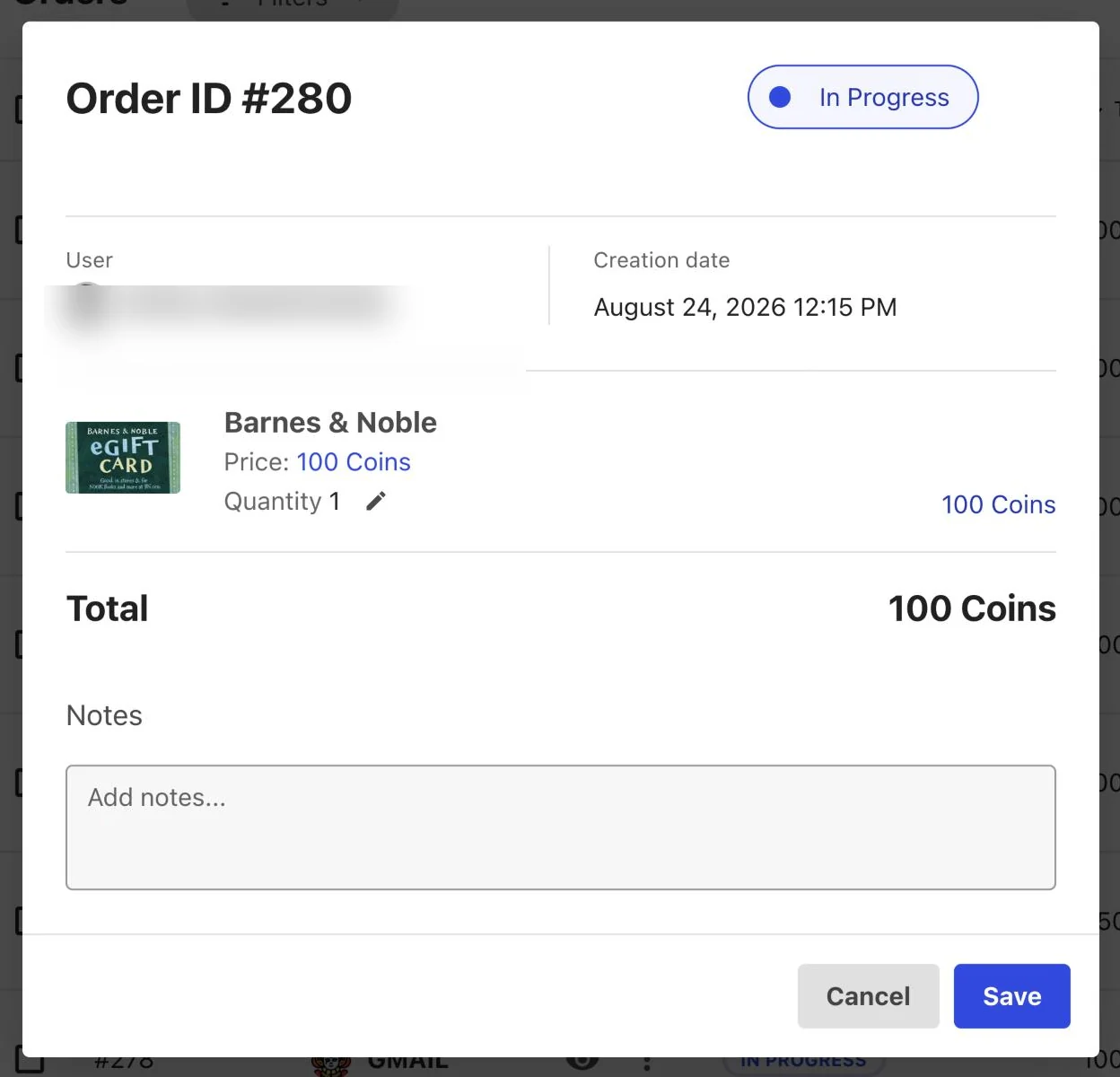
- Select the eye icon to open the order. You see:
- what was bought, with prices and quantities
- the buyer's comment
- Order details: the answers to your checkout questions, such as the delivery address
- If needed, change a quantity with the pencil next to it, or add internal Notes, such as a tracking number. Select Save.
- Close the order and, in its row, select More (⋮) and the next status, such as Approve.
Change many orders at once
- Select the checkboxes of the orders. To select every order, not just those on the page, use Select all N orders.
- Use the bulk status change and confirm the new status for each order.
This helps after a large merchandise drop.
Find and export orders
- Filters: filter by Status, buyer (User) or date range.
- Export downloads the filtered orders.
If a status change fails
| Message | What it means |
|---|---|
| Insufficient balance. | You tried to reopen an order, but the buyer no longer has enough coins. |
| Not enough quantity for product. | The item is out of stock. Add stock in Items. |
| Marketplace disabled. | The marketplace was turned off in Points and coins. |
Gift cards
Gift-card orders are fulfilled by the gift-card provider. Changing their status can send or cancel a real gift card.