
Appearance
Widgets
Employee Recognition appears on your intranet pages through one LumApps widget, Employee Recognition by Linkers. You choose which experience it shows in its settings.
Add a widget to a page
- Open the LumApps page in edit mode.
- Add a widget and choose Employee Recognition by Linkers.
- Select the widget on the page. Its settings open on the left.
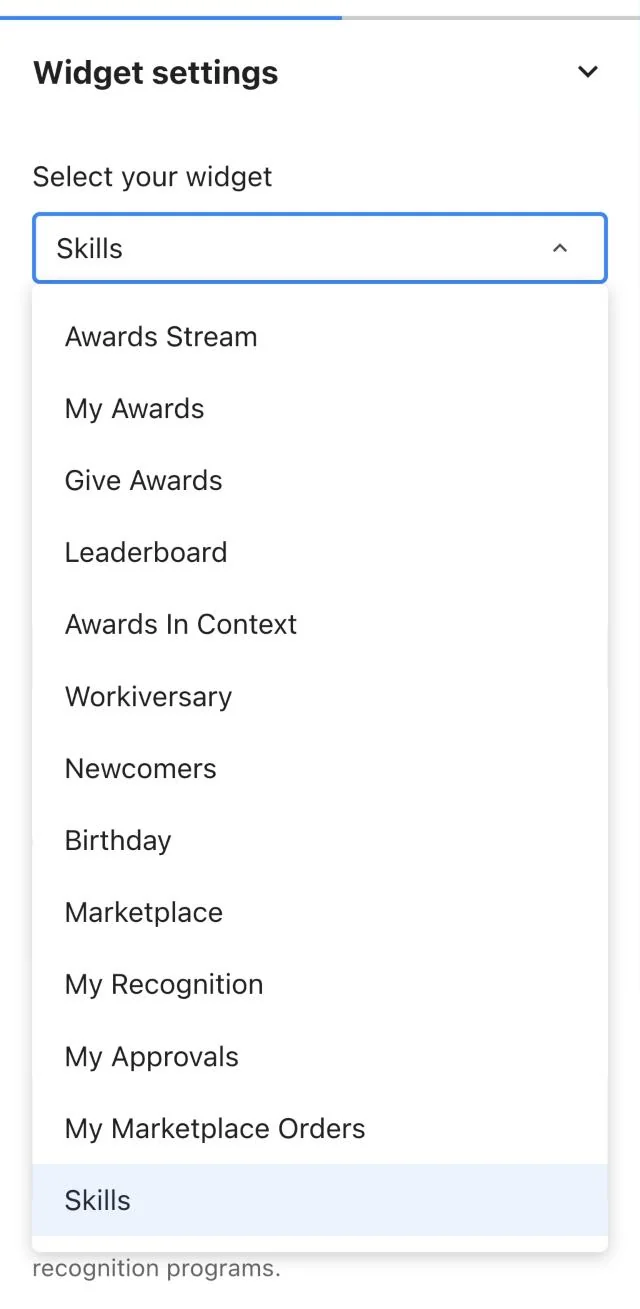
- In Select your widget, choose the type. A description appears under the field, and the settings below change to match.
- Set it up and publish the page.
Each copy of the widget keeps its own settings, so one page can hold several copies with different settings, for example one leaderboard per program.
Preview while you edit
Widgets show real data in edit mode, so you can check your settings before you publish.
Widget types
| Widget | What it shows | Needs first | Settings explained in |
|---|---|---|---|
| Awards Stream | The public feed of awards, with comments, reactions and sharing | Nothing | Awards Stream |
| Give Awards | The form or wizard for giving awards | A program with awards and participants | Awards and giving |
| My Awards | The viewer's trophy case | Nothing | My Recognition and profiles |
| My Recognition | The viewer's balances, awards, activity, approvals and orders | Nothing | My Recognition and profiles |
| My Approvals | Awards waiting for the viewer's decision | A program with approval turned on | Approvals |
| Leaderboard | Rankings by score, awards received or awards given | Nothing | Leaderboards |
| Skills | People with the skills recognized in their awards | Skills defined in Skills Management | Skills |
| Birthday | Recent, current and upcoming birthdays | Birthday awards turned on in a program | Birthdays |
| Workiversary | Work anniversaries | Workiversary turned on in a program, with milestone awards | Work anniversaries and newcomers |
| Newcomers | People who joined recently | The same, with a newcomers award | Work anniversaries and newcomers |
| Awards In Context | Awards for the author of the page or article | A program shared by authors and readers | Recognize content authors |
| Marketplace | The store where coins are spent | The marketplace turned on, and a marketplace with buyers and items | The store and shopping |
| My Marketplace Orders | The viewer's orders | The same | The store and shopping |
Settings most widgets share
| Setting | What it does |
|---|---|
| Select a recognition program | Limits the widget to one or more programs. |
| Select a recognition program for branding and translation | Uses one program's words and colors, or Global settings for the organization's. See Branding and wording. |
| Primary color, Secondary color | Colors for this widget only. Clear the field to go back to the branding colors. |
| Group filters | Limits the widget to members of chosen LumApps groups. |
| Items per page | Paging. The text under the field shows the default and the current value. |
| Title, Link, Advanced, Style tabs | The standard LumApps widget options: title, "see more" link, CSS class, spacing. |
Suggested pages
| Page | Widgets |
|---|---|
| Home page | Awards Stream (list, a few awards), Birthday, a compact Give Awards |
| Recognition hub | Give Awards, Awards Stream (grid), Leaderboard, Skills |
| Team or department page | Awards Stream and Leaderboard filtered by the team's group, Workiversary |
| Rewards page | Marketplace, My Marketplace Orders |
| Personal or mobile page | My Recognition, with Show only in mobile view on a mobile home page |
| Managers' page | My Approvals |
Features that don't need a widget
These appear on every page of a site once the site code is installed:
- the trophy icon and My Recognition
- awards, skills and the Give Award button on profiles
- awards under articles
- the windows that open from notifications
- the form that opens when someone scans a QR code