
Appearance
Points and coins
Every award has a value in points. The Points & Marketplace settings decide, for the whole organization, what those points mean: whether givers have a budget, and whether receivers earn coins to spend in a marketplace.
Three numbers to know
| Number | Belongs to | What it is | Changes when |
|---|---|---|---|
| Points to Give | The giver | A budget for giving awards. | Giving an award lowers it by the award's value. It refills on a schedule. |
| Total Score | The receiver | The total value of the awards received. Used by leaderboards. | Receiving an award raises it. |
| Coins (Coin Balance) | The receiver | Currency for the marketplace. | Receiving an award raises it; ordering lowers it. |
More rules:
- Automatic awards (birthday, work anniversary, newcomer and automated awards) cost nobody any points. Receivers still gain score and coins.
- For a team or group award, each receiver gets the full value, and the giver pays for each receiver.
- If an award is deleted, all three numbers are reversed.
- Points to Give are taken when the award is submitted, even if it then waits for approval.
At a glance
- Turn on the marketplace (optional)
- Adjust balances by hand (when needed)
Choose an allowance strategy
| Strategy | How it works | Good for |
|---|---|---|
| No limit | People give as many awards as they like. There is no budget, and the marketplace is off. | Pure culture programs, where an award's value is only a weight. |
| Points expire | Every day, week or month, each giver's budget is reset to a fixed amount, for example 500 points a month. Unused points are lost. | Encouraging people to use their budget regularly. |
| Points accumulate | Every period, the budget grows by a fixed amount, up to a Points limit. | Letting people save up for bigger awards. |
Budgets refill at midnight: every day, every Sunday, or on the 1st of the month.
- Go to Global Management → Points & Marketplace.
- Select Change strategy and choose a strategy.
- Fill in its settings:
- Points expire: Allowance frequency & validity period and Allowance amount per period.
- Points accumulate: Allowance period, Allowance amount per period and Points limit.
- No limit: choose whether to Display award value in widgets. With the other two strategies, values are always shown.
- Select Save. Widgets use the new settings straight away.
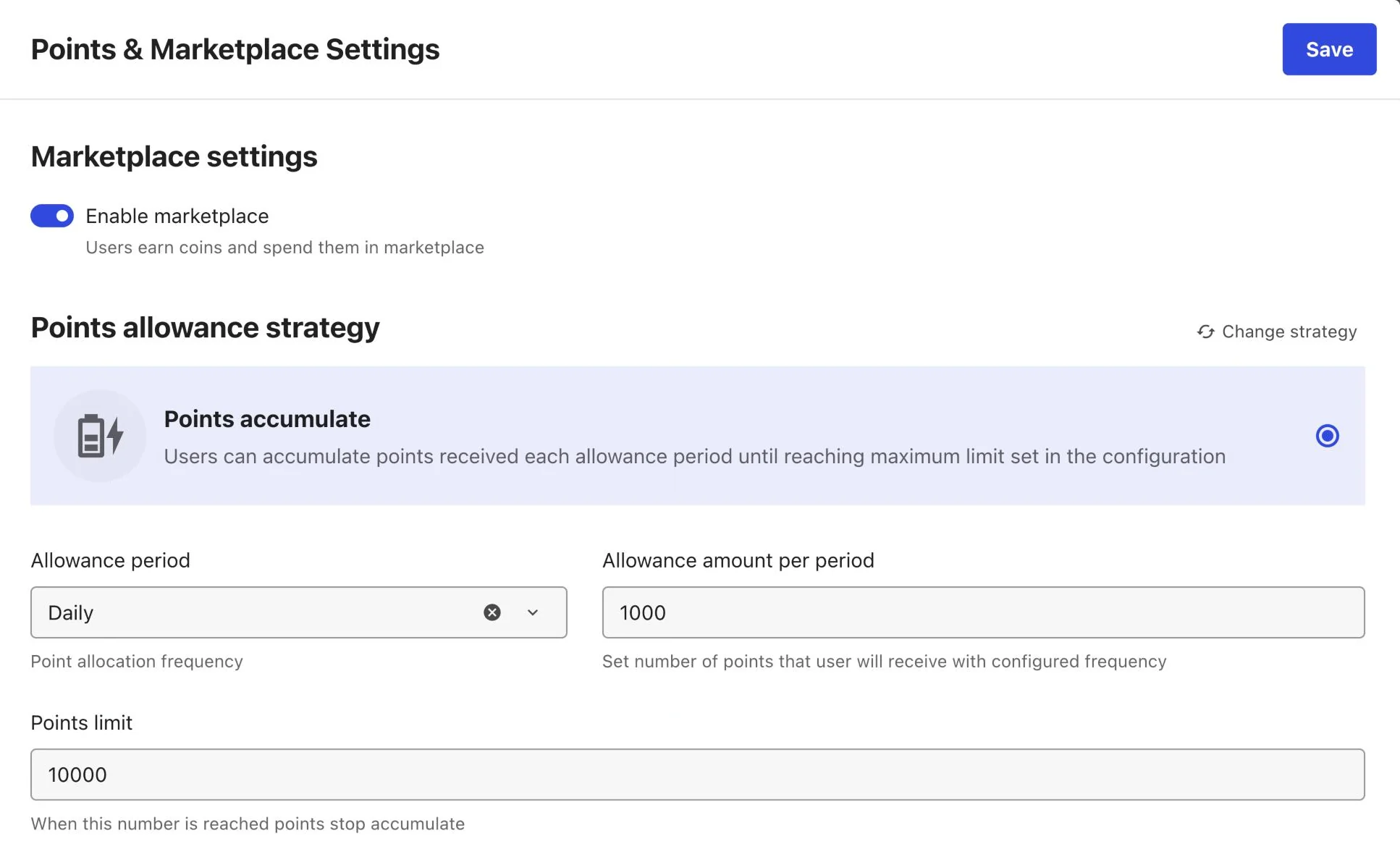
Sizing the budget
Compare the budget with your award values. With awards worth 10 to 100 points, a monthly budget of 500 lets someone give between 5 and 50 awards a month.
Turn on the marketplace
The marketplace needs a budget: Points expire or Points accumulate.
- On Points & Marketplace, turn on Enable marketplace.
- Select Save.
From then on, every award received also earns one coin per point. Next, create a marketplace.
Switching to No limit turns the marketplace off
If you switch to No limit, a warning explains the consequence: people can no longer use their coins, and marketplace widgets are hidden. Acknowledge only closes the warning; nothing changes until you select Save.
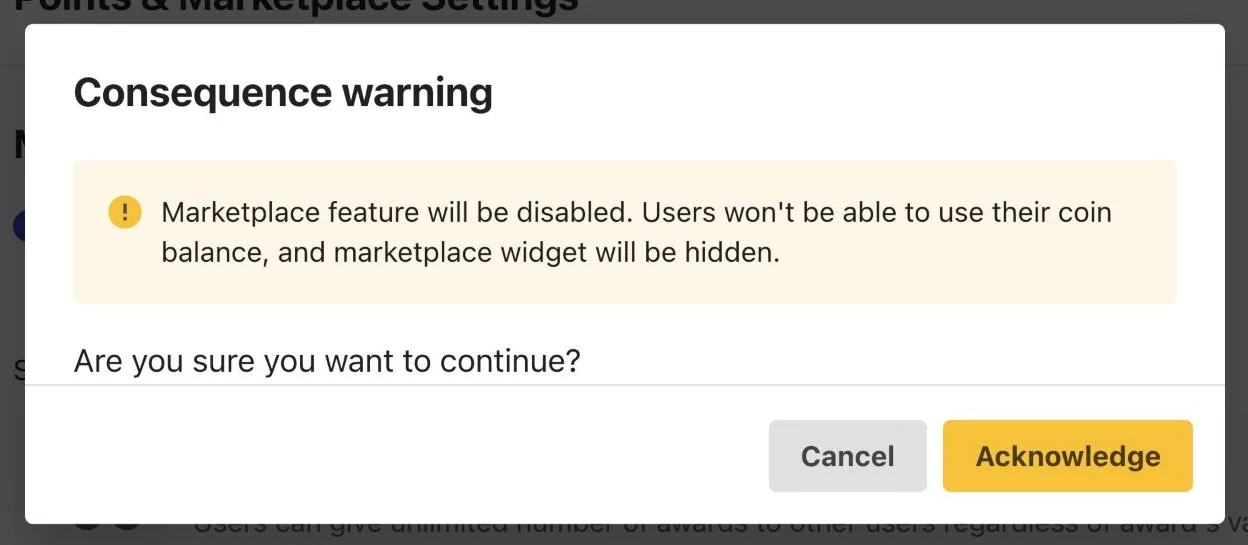
What employees see
| With this setting… | …employees see |
|---|---|
| Points expire or Points accumulate | A green You have N Points to Give bar in the giving form. After choosing an award: Your Points to Give, Award Value and Remaining Points to Give. If the award costs too much: Points Lacking, and the award can't be given. A Points to Give tile in My Recognition. |
| No limit | No bar and no tile. Award values show only if Display award value is on. |
| Enable marketplace on | A Coin Balance tile and a Marketplace tab in My Recognition, and working Marketplace widgets. |
| Enable marketplace off | No coin balance anywhere. Marketplace widgets are hidden. |
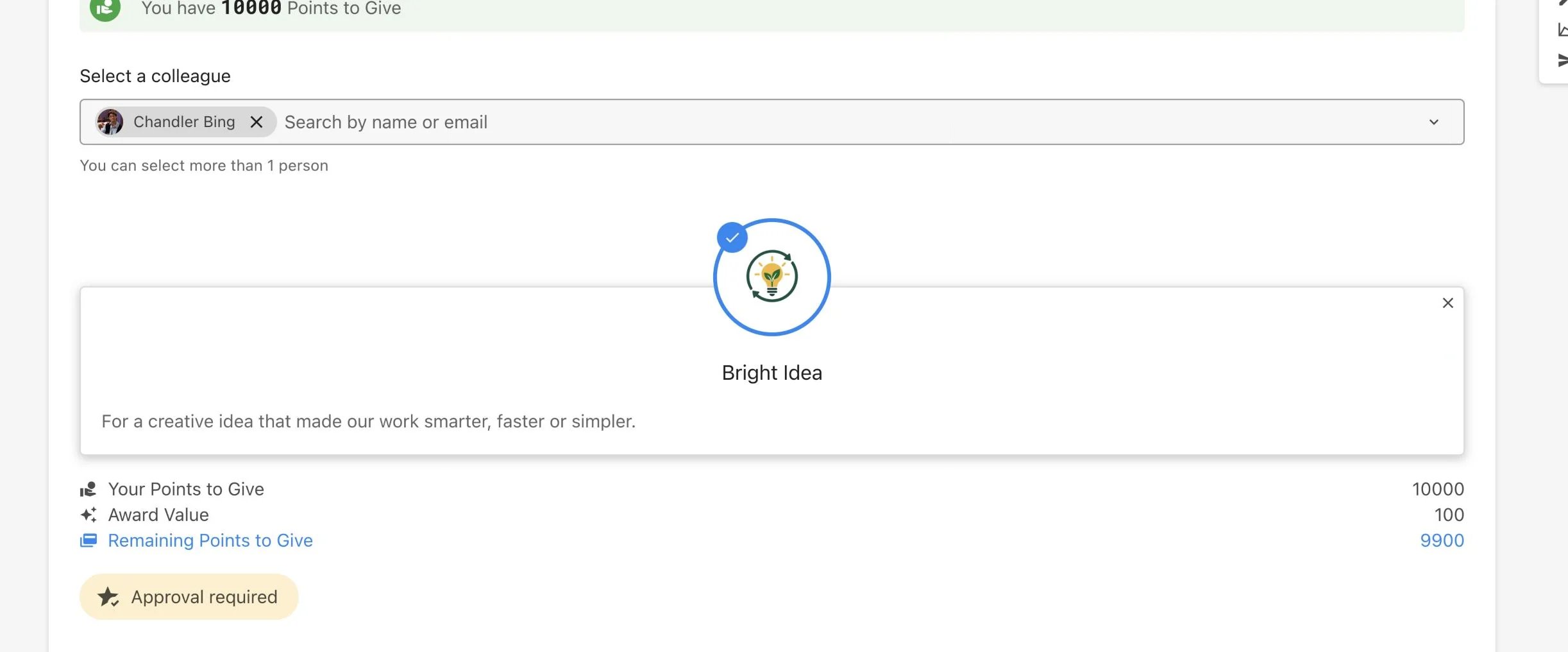
The word Coins can be changed, for example to Stars, in Branding and wording.
Troubleshooting
| Symptom | Cause | Fix |
|---|---|---|
| Insufficient balance. when giving | The giver has used their budget. | It refills at the next period. To add points now, use User Balance. |
| Enable marketplace can't be turned on | The strategy is No limit. | Choose Points expire or Points accumulate first. |
| "The strategy must be selected" | No strategy is chosen. | Select Change strategy. |
| Someone asks where their coins went | Orders, removed awards or manual changes. | Look them up in User Coins Analytics. |